
Parallax Monitor: A Game-Changer for Nikon ZR Users, Bringing Professional Monitoring and Control to a New Level

The landscape of professional video production is in a constant state of evolution, with camera technology rapidly advancing and demanding more sophisticated tools for image capture and monitoring. For users of the Nikon ZR, a camera that has garnered significant attention for its capabilities, a common refrain has emerged regarding certain limitations in its native control and monitoring features. These shortcomings, particularly when compared to the robust offerings found in higher-end cinema cameras, have left many Nikon ZR owners yearning for more advanced functionalities. This article delves into the emergence of a new application, Parallax Monitor, which promises to bridge this gap, offering professional-grade tools at an accessible price point and fundamentally enhancing the user experience for Nikon ZR videographers.
The Need for Advanced Monitoring on the Nikon ZR
The Nikon ZR has established itself as a compelling option for videographers seeking a balance of advanced features and a manageable form factor. However, like many cameras in its class, it doesn’t ship with the comprehensive suite of monitoring tools that seasoned professionals have come to expect from dedicated cinema cameras. Features such as false color, anamorphic de-squeeze, and advanced exposure indicators, while perhaps not essential for every user, are considered indispensable by many for critical on-set decision-making.
Historically, professional cinema cameras from manufacturers like RED have set a benchmark with their integrated control applications. RED’s proprietary "traffic light" system, for instance, has been lauded as a revolutionary tool for nailing exposure, a sentiment echoed by many who have transitioned to or utilized RED cinema cameras. The RED Control app, known for its deep integration and comprehensive feature set, has been a significant draw for filmmakers. However, its incompatibility with Nikon cameras, including the ZR, has left a void for users who appreciate the ZR’s imaging prowess but desire a similar level of remote control and monitoring.
The native Nikon SnapBridge app, while functional for basic file transfer and remote shooting, does not offer the sophisticated video-centric monitoring and control capabilities that Parallax Monitor aims to provide. This has created an opportunity for third-party developers to step in and address the unmet needs of the Nikon ZR user base.
The Genesis of Parallax Monitor: A Developer’s Vision
The story behind Parallax Monitor is one of innovation born from industry shifts and a deep understanding of user needs. The application was developed by Mike Aguado, a former systems engineer at Marvel, who found himself with newfound time following a period of industry-wide restructuring due to advancements in artificial intelligence. Leveraging his technical expertise and a passion for filmmaking, Aguado turned his attention to the Nikon ZR, a camera he himself owned.
Aguado recognized the prevalent user feedback regarding the ZR’s monitoring limitations and the desire for a more capable control application. He embarked on a journey to reverse-engineer existing Nikon tools and, crucially, to capitalize on Nikon’s release of a Software Development Kit (SDK) for third-party developers. This SDK provided the essential framework for Aguado to develop an application that could interface directly with the camera’s core functionalities.
The initial development phase saw the application under the working title "ZR Ctl," a name that directly referenced its intended purpose. The development process was not merely a technical exercise; it was driven by a genuine desire to empower filmmakers with tools that could elevate their craft. Aguado’s background as a systems engineer, coupled with his immersion in the filmmaking community, allowed him to anticipate and address the specific demands of professional users.
A Chance Encounter at Cine Gear Expo
The public debut of Parallax Monitor, or its earlier iteration, was serendipitous. During Cine Gear Expo, a prominent event in the filmmaking industry, the author of the original piece encountered Mike Aguado. While covering the event with his Nikon ZR, Aguado’s camera caught the attention of a fellow attendee, who turned out to be Aguado himself. This chance meeting provided an opportunity for an in-depth conversation, during which the author, who had been testing the app in its beta phase, discovered the identity of its creator. This personal connection underscored the developer’s hands-on approach and his direct engagement with the user community.
Cine Gear Expo, held annually, typically serves as a platform for manufacturers to unveil new technologies and for industry professionals to connect and share insights. Events like these are crucial for fostering innovation and providing creators with the tools they need to push the boundaries of visual storytelling. Aguado’s presence at the expo, showcasing his independently developed application, highlights the growing trend of user-driven solutions within the creative technology sector.
Bridging the Gap: Parallax Monitor’s Key Features
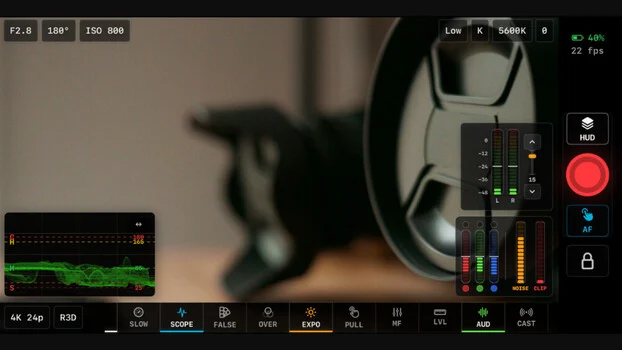
Parallax Monitor is designed to emulate and, in some cases, surpass the monitoring and control capabilities found in professional cinema cameras. The application offers a comprehensive suite of tools aimed at improving exposure accuracy, streamlining workflow, and enhancing the overall shooting experience for Nikon ZR users.
H2: Advanced Exposure Tools: Beyond Native Capabilities
One of the most significant contributions of Parallax Monitor is its implementation of advanced exposure monitoring tools. This includes:
- False Color: A staple in professional cinematography, false color overlays provide a visual representation of exposure levels across the image, allowing users to quickly identify blown-out highlights or crushed blacks. Parallax Monitor offers this critical tool, enabling precise exposure control even in challenging lighting conditions.
- X-Lights: While RED’s patented traffic light system is a proprietary feature, Mike Aguado has developed a remarkably similar system called "X-Lights" for Parallax Monitor. This innovative feature provides real-time visual cues for exposure, mimicking the functionality that has made RED cameras so popular for its direct feedback on image integrity. This is particularly crucial for formats like N-RAW, where understanding exposure is paramount for post-production flexibility.
- X-Zone: Complementing the false color capabilities, X-Zone is a novel false color variant that offers an additional layer of exposure analysis, providing users with even more nuanced control over their image’s tonal range.
H3: Anamorphic De-Squeeze and Customization
For filmmakers working with anamorphic lenses, which capture a wider field of view by horizontally compressing the image, accurate monitoring is essential. Parallax Monitor addresses this by offering robust anamorphic de-squeeze functionality.
- Standard De-Squeeze Ratios: The app supports all commonly used anamorphic desqueeze factors (e.g., 1.33x, 1.5x, 2x), allowing users to view their footage in its intended aspect ratio directly on their mobile device.
- Custom De-Squeeze Values: Recognizing the diversity of anamorphic lenses and shooting styles, Parallax Monitor allows users to input custom desqueeze values, both horizontally and vertically. This level of customization ensures compatibility with a wide range of anamorphic setups.
H3: Comprehensive Camera Control
Beyond monitoring, Parallax Monitor provides direct remote control over various camera settings, transforming a mobile device into a powerful command center:
- Camera Settings Adjustment: Users can modify crucial camera parameters such as white balance, ISO, aperture, shutter speed, and frame rates remotely.
- Recording Format and View Options: The app allows for on-the-fly changes to recording formats and display options, streamlining the setup process and enabling quick adjustments during a shoot.
- Remote Run/Stop: For situations where the camera is mounted remotely or in hard-to-reach locations, the ability to start and stop recording from a connected device is invaluable.
- Focus Peaking: Accurate focus is critical for sharp imagery. Parallax Monitor implements focus peaking across all supported codecs, providing a clear visual indicator of in-focus areas.
- Viewing LUTs: The app supports the integration of viewing LUTs (Look-Up Tables), enabling users to monitor their footage with creative color grades applied, offering a more accurate preview of the final image.
Expanding Reach: Beyond the Nikon ZR
While initially developed with the Nikon ZR in mind, Mike Aguado’s vision for Parallax Monitor extends further. The application has demonstrated compatibility with other Nikon cameras, notably the Nikon Z9. This expansion signifies the potential for Parallax Monitor to become a versatile tool for a broader segment of Nikon’s mirrorless camera lineup, further solidifying its value proposition for a larger user base. The ability to bring advanced monitoring features like X-Lights and false color to cameras like the Z9, which already possess significant video capabilities, is a testament to the app’s adaptability.
Technical Integration and Connectivity
Parallax Monitor offers multiple connection methods to ensure seamless integration with the Nikon ZR and other compatible cameras. The developers have provided clear, step-by-step instructions within the app itself, catering to users who may find technical setup details challenging. This user-friendly approach to connectivity is a critical factor in making advanced technology accessible. While specific connection protocols are detailed on the developer’s website (zrctl.com), the app’s design prioritizes ease of use and immediate functionality. The inclusion of embedded tutorials further demystifies the setup process, ensuring that users can quickly get their cameras connected and start utilizing the app’s features.
Future Development and Broader Implications
Mike Aguado has indicated that the development of Parallax Monitor is an ongoing process, with plans to introduce even more advanced features in future updates. These anticipated additions include:
- Multicam Support: The ability to control and monitor multiple cameras simultaneously would be a significant advancement for larger productions.
- Jam Sync Timecode: Precise timecode synchronization across multiple devices is crucial for professional post-production workflows, particularly for multi-camera shoots.
- Enhanced Tethering Options: Further integration of the camera’s photography capabilities through tethering would broaden the app’s utility for hybrid shooters.
The emergence of Parallax Monitor has broader implications for the camera accessory market and the expectations of users. It demonstrates that innovative solutions can come from independent developers, challenging the notion that advanced features are solely the domain of camera manufacturers. This trend could lead to increased competition, driving further innovation and potentially lowering the cost of professional-grade tools for independent filmmakers and content creators.
Accessibility and Investment
Parallax Monitor is available on iOS for $19.99, with an Android version offered under the "ZR Ctl" name on Google Play. This remarkably low price point makes it an exceptionally accessible investment for any Nikon ZR owner looking to enhance their video production capabilities. In an industry where professional equipment can often run into thousands of dollars, an application that delivers such a significant upgrade in functionality for under twenty dollars represents exceptional value. It democratizes access to tools that were once exclusive to high-end cinema cameras, empowering a wider range of creators to achieve professional results.
Conclusion
Parallax Monitor represents a significant leap forward for Nikon ZR users. By providing a comprehensive suite of advanced monitoring and control features, developed by a former systems engineer with a keen understanding of filmmaking needs, this application addresses critical limitations and unlocks new creative potential. Its affordability, ease of use, and ongoing development trajectory position it as an indispensable tool for any serious videographer utilizing the Nikon ZR, and potentially other Nikon cameras in the future. The app is not just a software solution; it’s a testament to how innovation and user-centric design can democratize access to professional filmmaking technology.
Related posts: