
BenQ iScreenBar Review: Evaluating the iMac-Centric Monitor Light for Minimalist Workstations

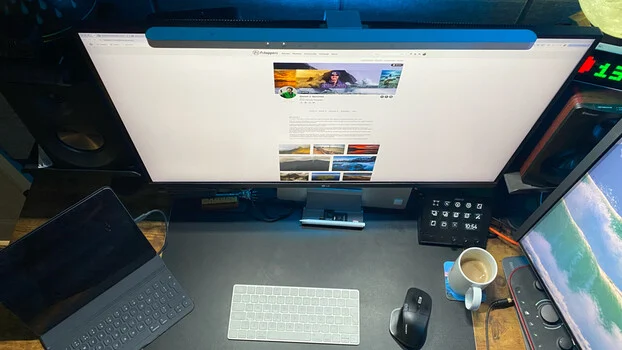
The evolution of modern workspace ergonomics has placed a renewed focus on environmental factors that influence daily productivity, eye strain, and desktop organization. While millions of professionals spend upwards of eight hours a day in front of computer displays, ambient desktop illumination is frequently overlooked, often resulting in sub-optimal lighting conditions that contribute to visual fatigue and cluttered work surfaces. For years, display accessory manufacturers have sought to engineer lighting solutions that eliminate the traditional bulky desk lamp, which consumes valuable surface area and introduces unwanted glare. Among these innovators, BenQ has established a dominant market presence through its established ScreenBar product line. The company’s latest entry into this specialized market segment is the iScreenBar, a peripheral engineered specifically to complement Apple’s iconic all-in-one desktop computers. This comprehensive review examines the design, functionality, optical engineering, and broader market implications of BenQ’s newly released monitor-mounted lighting solution, analyzing its performance both within its intended ecosystem and in alternative desktop configurations.
Background Context and Evolution of Monitor Lighting Technology
To understand the positioning of the BenQ iScreenBar, it is necessary to examine the trajectory of desktop illumination technology over the past decade. Traditional desk lamps, while effective at casting light over physical documents and keyboards, present significant ergonomic drawbacks in computer-centric environments. These conventional fixtures require dedicated surface space, frequently create harsh shadows, and project reflective glare across glossy or matte monitor panels. This glare forces the human eye to constantly adjust between the high-luminance display and scattered light reflections, accelerating ocular fatigue.
BenQ’s entry into the monitor light bar market disrupted this paradigm by introducing asymmetric optical engineering. By mounting directly to the top bezel of a display, a light bar projects an angled beam of illumination downward onto the user’s immediate workspace—the keyboard and mouse area—while strictly preventing light rays from striking the glass of the monitor itself. Powered entirely via a standard USB connection, these devices eliminated the need for secondary wall plugs or cumbersome desk bases.
The introduction of the iScreenBar represents a targeted evolution of this concept. Rather than serving as a universal accessory compatible with any arbitrary monitor thickness or bezel profile, BenQ developed the iScreenBar to match the precise aesthetic language, color profile, and structural dimensions of post-2021 24-inch Apple iMac models. This marked a strategic pivot toward hardware ecosystem integration, reflecting a broader industry trend where peripheral manufacturers design products tailored to the exact specifications of premium computing hardware.
Design Architecture and Industrial Aesthetics
From an industrial design perspective, the BenQ iScreenBar aligns seamlessly with the minimalist philosophy popularized by Apple. Constructed with a robust yet lightweight aluminum outer casing and finished in a refined silver tone, the unit avoids the utilitarian or intrusive appearance of standard computer peripherals. When mounted, it integrates fluidly with the display architecture, preventing the visual dissonance often caused by aftermarket accessories.
The physical dimensions and mounting mechanism are engineered specifically to accommodate the ultra-thin chassis of modern iMacs. The mechanical grip secures the fixture firmly to the top bezel without exerting undue pressure on the internal display components or obstructing the integrated FaceTime camera systems. Furthermore, cable management is handled efficiently; the included USB-C power cable can be routed discreetly down the rear support arm of the display, maintaining an immaculate desktop aesthetic free of visible wiring.
In terms of physical interface, BenQ has abandoned traditional protruding mechanical buttons in favor of flush, touch-sensitive capacitive controls embedded directly into the upper chassis of the light bar. This design choice preserves the clean, unbroken lines of the hardware while offering responsive adjustments to brightness levels and color temperature. Users can transition smoothly from a high-focus, cool white daylight spectrum (ideal for analytical tasks and daytime productivity) to a softer, warmer amber hue designed to reduce blue light exposure during evening work sessions.
Optical Performance and Asymmetric Lighting Technology
The core value proposition of any lighting fixture lies in the quality and distribution of its illumination. The BenQ iScreenBar utilizes advanced asymmetric optical engineering to ensure precise control over photon dispersion. According to manufacturer specifications, the unit is capable of delivering a 500-lux coverage area spanning approximately 85 centimeters by 50 centimeters, effectively illuminating standard keyboards and peripheral workspace zones without generating hot spots or localized glare.
For professionals engaged in color-critical workflows—such as digital photographers, graphic designers, and video editors—the elimination of screen glare is paramount. Traditional desk lamps positioned to the side or rear of a monitor inevitably cast stray light across the glass, reducing perceived contrast, altering color perception, and causing distracting reflections. The iScreenBar’s precise downward cutoff prevents these optical anomalies, ensuring that the integrity of the monitor’s color calibration remains uncompromised by ambient light interference.
While the iScreenBar is not intended to replace professional, high-CRI (Color Rendering Index) studio lighting environments calibrated for rigorous fine-art color grading, it excels at providing balanced, comfortable ambient illumination for day-to-day computer interaction. By establishing a comfortable gradient between the luminous display panel and the surrounding desk surface, the fixture mitigates the harsh contrast of working in a dark room with a bright monitor as the sole light source.
Smart Features: Video Mode and Presence Detection
Beyond basic illumination, the BenQ iScreenBar incorporates several advanced software- and hardware-driven features designed to enhance user workflow. Chief among these is Video Mode, an automated lighting distribution setting engineered to optimize conditions for video conferencing and virtual meetings. When engaged, the central portion of the LED array attenuates, while the outer side sources remain active. This asymmetric distribution prevents direct light from washing out webcam sensors or creating unflattering facial shadows, thereby improving video quality during professional communications.
Additionally, the unit features integrated infrared or capacitive presence detection. This smart sensor functionality automatically activates the light when the user approaches the desk and deactivates the fixture when the workspace is vacated. While this feature promotes energy efficiency and hands-free operation, practical usage reveals a minor operational caveat. The motion-sensing algorithm is calibrated to detect gross motor movements; consequently, if a user remains relatively motionless for an extended duration—such as during meticulous image retouching, digital painting, or reading—the sensor may interpret the stillness as an empty desk, prompting the light to automatically switch off after approximately three minutes. While easily overridden by a wave of the hand or a touch of the control panel, this characteristic requires a brief period of user adaptation.
For comprehensive system control, BenQ provides a dedicated macOS application. This software utility enables users to manage illumination parameters directly from the operating system interface, save custom lighting presets, and automate environmental settings based on time-of-day schedules, though the physical touch controls on the unit itself remain the primary method for most day-to-day adjustments.
Ecosystem Compatibility and Cross-Platform Utilization
A critical factor for prospective buyers is hardware compatibility. BenQ officially engineered the iScreenBar exclusively for compatible 24-inch Apple iMac models released from 2021 onward. The mounting bracket, weight distribution, and sensor alignment are calibrated specifically for the unique physical dimensions of these specific machines. The manufacturer explicitly states that the device does not officially support other display models or third-party monitors.
Despite these official parameters, evaluation of the hardware reveals that the core lighting concept, power delivery system, and touch-interface controls function effectively when adapted to alternative thin-bezel displays, provided the user accepts that the specialized mechanical fit and integrated software features (such as specific camera-alignment functions) are optimized solely for the designated iMac lineup. However, consumers utilizing non-iMac displays should carefully evaluate alternative, universally compatible models within BenQ’s broader ScreenBar catalog rather than assuming seamless integration with the iScreenBar variant.
Economic Analysis: Assessing Value and Market Positioning
Priced at an MSRP of $189, the BenQ iScreenBar occupies the premium tier of the monitor lighting market. Compared to generic USB-powered LED strips or budget-oriented Chinese import light bars—which often retail for a fraction of the cost—the iScreenBar requires a substantial financial commitment.
An objective economic analysis of this pricing structure reveals that consumers are paying a premium not merely for basic LEDs, but for integrated industrial design, proprietary asymmetric optical engineering, high-grade aluminum materials, touch-capacitive control systems, and automated presence-sensing technology. For owners of compatible iMacs seeking an integrated, clutter-free desk accessory that preserves the minimalist aesthetic of Apple’s hardware while significantly enhancing ergonomic comfort, the investment is justified by the device’s build quality and performance. Conversely, users seeking basic keyboard illumination without aesthetic or ecosystem considerations will find more cost-effective alternatives widely available.
Broader Implications for Ergonomics and Workspace Design
The commercial reception of specialized peripherals like the BenQ iScreenBar underscores a broader, ongoing transformation in modern workspace design. As remote work, hybrid professional models, and home office investments continue to expand globally, consumers are increasingly prioritizing ergonomic optimization and visual comfort. Peripheral manufacturers are responding by shifting focus from purely functional computing accessories to integrated environmental wellness tools.
By addressing the intersection of workspace illumination, eye strain reduction, and desktop spatial efficiency, monitor light bars have transitioned from niche enthusiast gadgets to mainstream productivity enhancements. As optical engineering and smart sensor technologies continue to mature, future iterations of these devices are expected to incorporate advanced biometric feedback, circadian rhythm synchronization, and deeper smart-home integration, further cementing their role as essential components of the modern professional workstation.
Conclusion
The BenQ iScreenBar successfully bridges the gap between high-end industrial design and functional workspace ergonomics, delivering superior illumination without compromising desktop real estate or visual clarity. While its official compatibility is strictly limited to post-2021 24-inch iMac models, its core optical performance, minimalist aesthetic, and intuitive touch controls demonstrate the high standards of BenQ’s engineering division. For targeted consumers within the Apple ecosystem seeking to elevate their daily workflow and eliminate desk clutter, the iScreenBar represents a refined, albeit premium, solution to modern desktop lighting challenges.