
Mastering Flight Price Tracking: A Comprehensive Guide to Using Google Flights Price Alerts for Maximum Savings

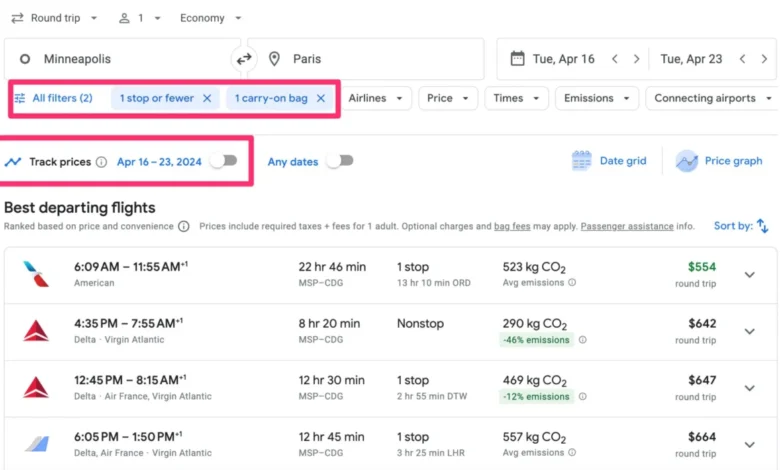
Navigating the volatile world of airfare pricing has long been one of the most stressful aspects of travel planning. Travelers constantly grapple with the timeless dilemma of whether to purchase a ticket immediately or wait in hopes that fares will drop. This uncertainty becomes particularly acute during peak travel periods, such as major holidays and summer vacation seasons, when demand surges and airline pricing algorithms fluctuate rapidly. To mitigate this guessing game, digital tools have evolved to give consumers a distinct advantage. Among them, Google Flights stands out as a premier resource, offering a suite of advanced features designed to decode airline pricing structures. Chief among these capabilities is the Google Flights price alert system, a mechanism that tracks route fluctuations in real time and delivers automated notifications directly to a user’s inbox.
Understanding the Mechanics of Google Flights Price Alerts

The core function of a price alert is to remove the burden of manual surveillance. Traditionally, securing the best airfare required travelers to repeatedly visit airline websites or aggregator platforms multiple times a day, noting price shifts by hand. Google Flights automates this surveillance. Once a user initiates a search for a specific route and activates the tracking feature, the platform monitors the designated itinerary continuously.
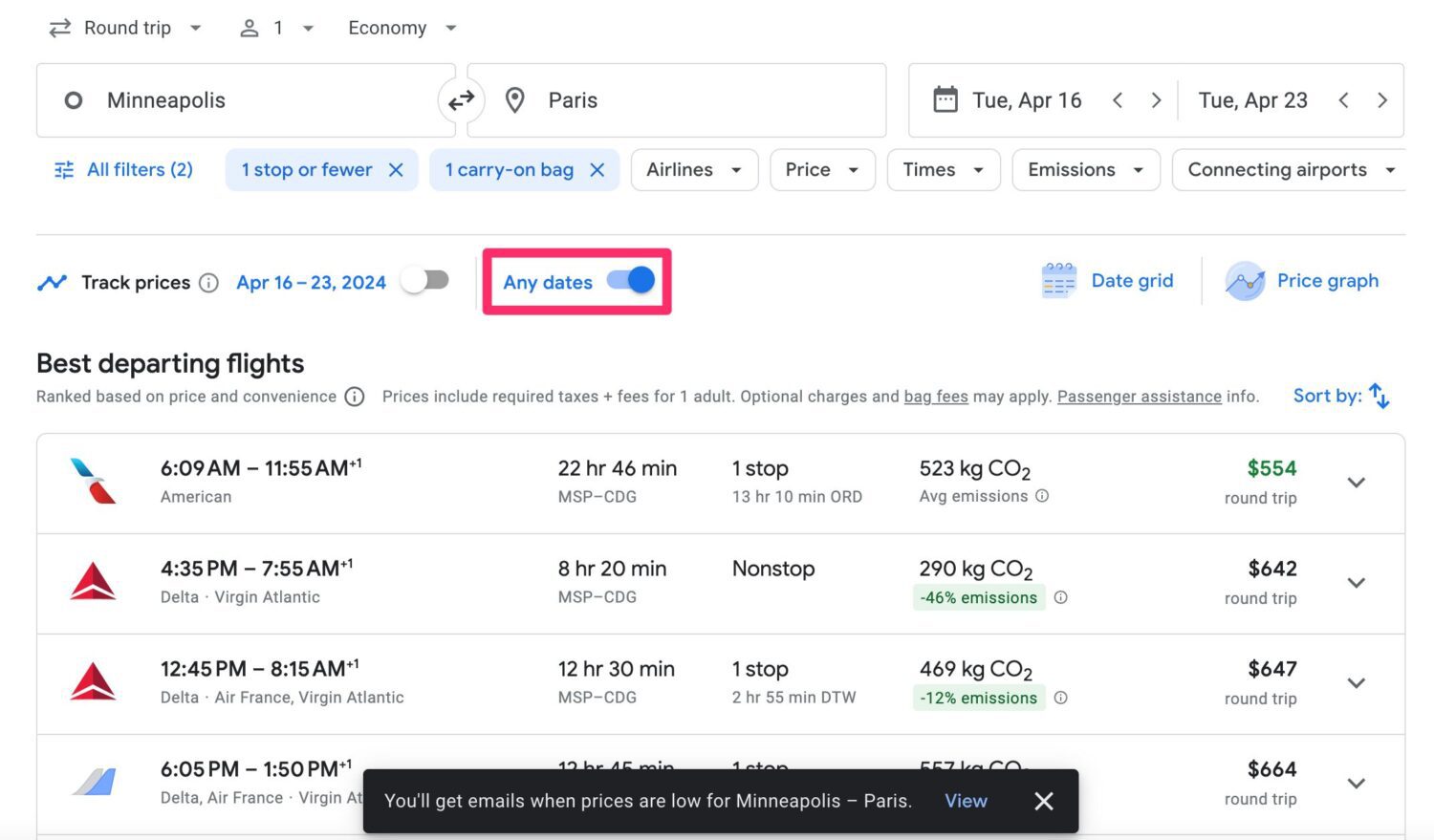
When a significant price drop or increase occurs, an email notification is dispatched to the user’s linked Gmail account. This functionality has recently expanded beyond rigid itineraries. While travelers can still track exact departure and return dates, the platform now accommodates flexible date searches. By opting to track price movements across "any dates" within a specified one-month window, consumers who have flexible travel schedules can uncover deeper discounts that they might have otherwise missed by locking themselves into a narrow timeframe.
Step-by-Step Instructions: How to Set Up and Manage Price Tracking
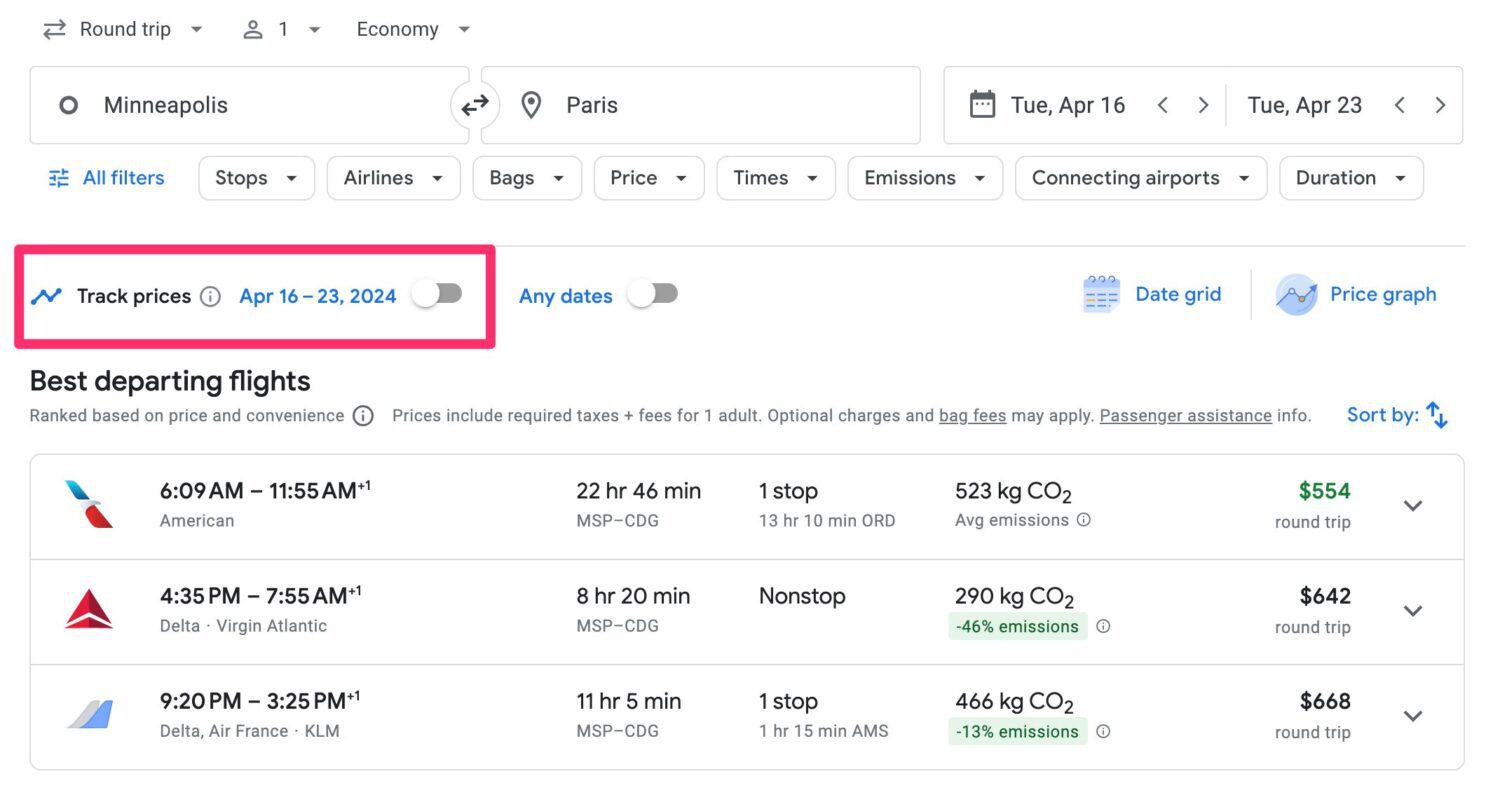
Setting up price alerts on Google Flights requires minimal technical proficiency, yet it offers granular control over the types of flights being monitored.
Step 1: Initiate the Search
The process begins on the Google Flights homepage. Users must input their departure city, destination airport, and intended travel dates. Additionally, travelers can specify ticket parameters such as round-trip or one-way status, the number of passengers, and the desired cabin class, ranging from basic economy to first class.
Step 2: Apply Custom Filters
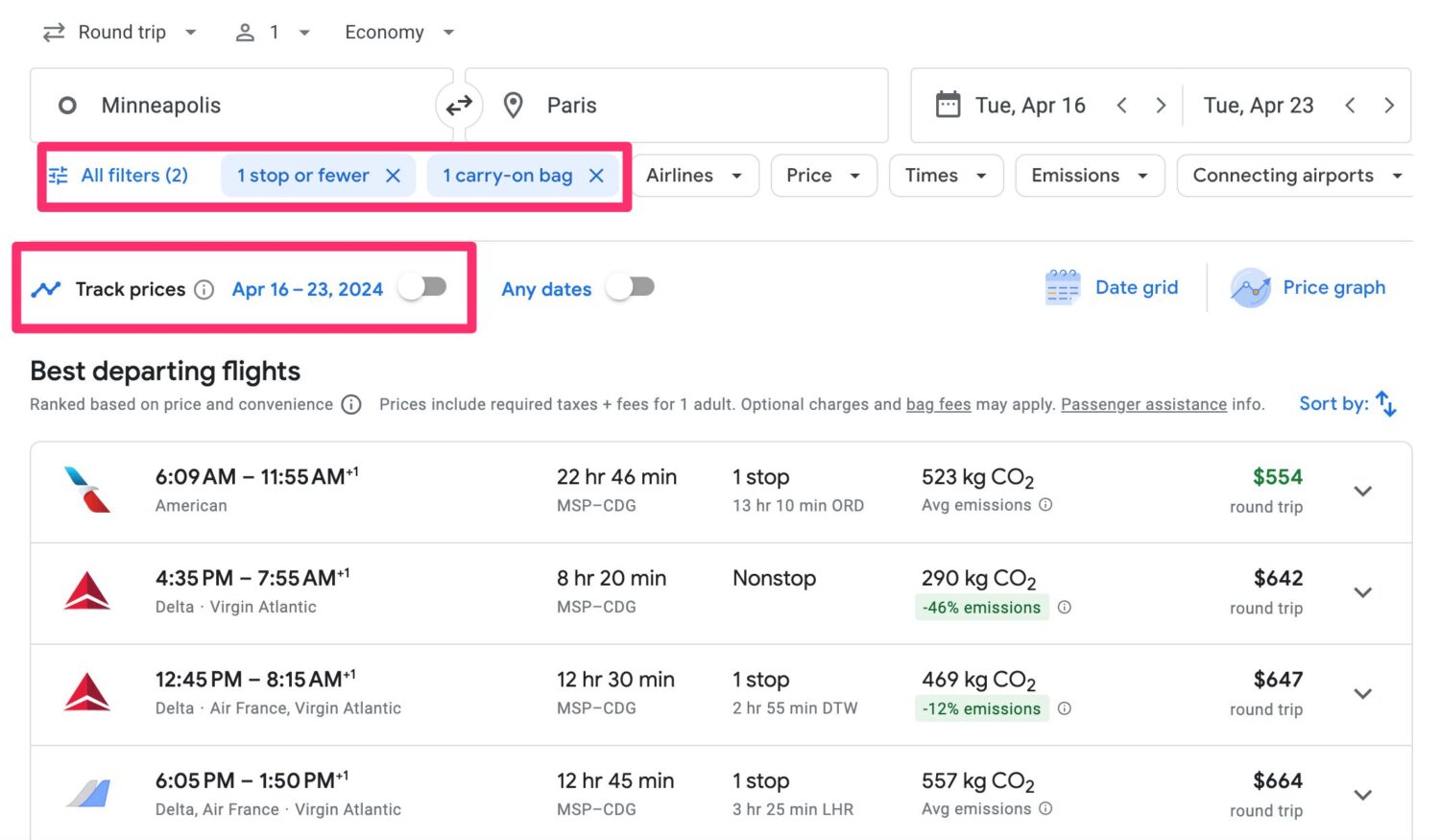
Before activating the tracking feature, users can refine their search results using a robust set of filters. These parameters allow travelers to isolate specific airlines, limit the number of connections, specify acceptable layover durations, and even factor in baggage allowances. It is critical to apply these filters prior to setting the alert, because the system will only track price movements for flights that strictly meet the defined criteria. Fares that do not align with these filters will be excluded from the alerts.
Step 3: Enable the Track Prices Toggle
Once the search results load and the appropriate filters are applied, users will locate a toggle button labeled "Track prices," typically marked by a distinct visual indicator beneath the primary flight options. Toggling this switch on activates the monitoring service. A valid Gmail account is required to complete this step and receive subsequent notifications.
Step 4: Monitor and Review via the Dashboard
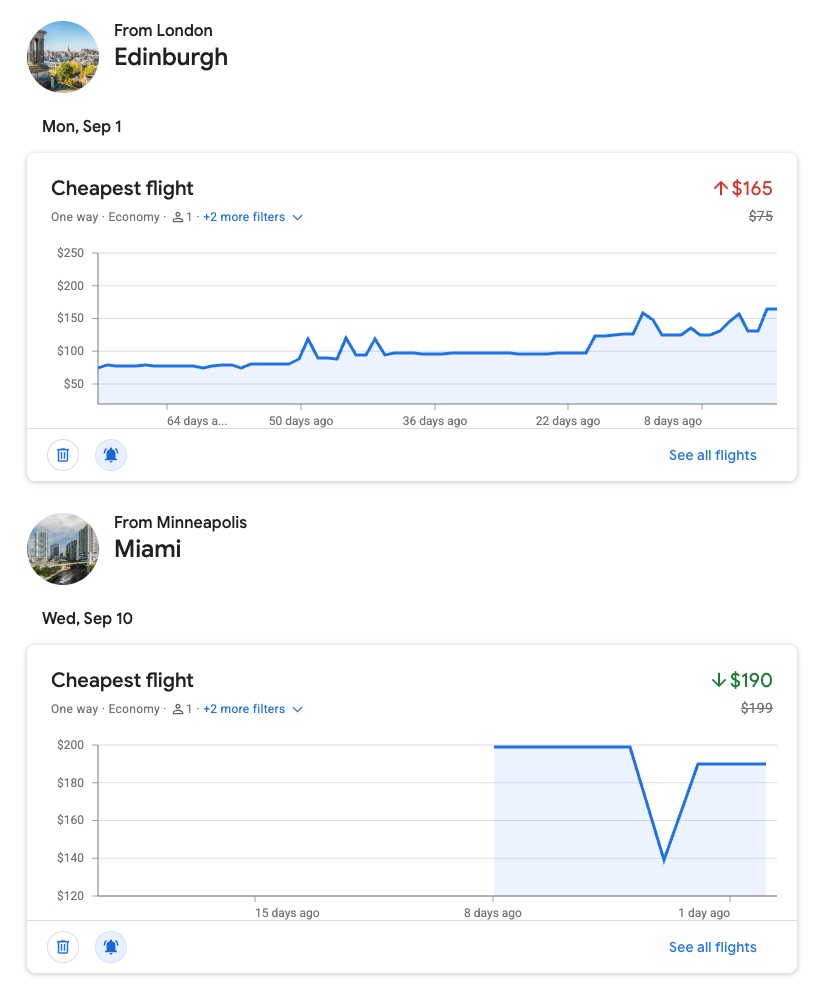
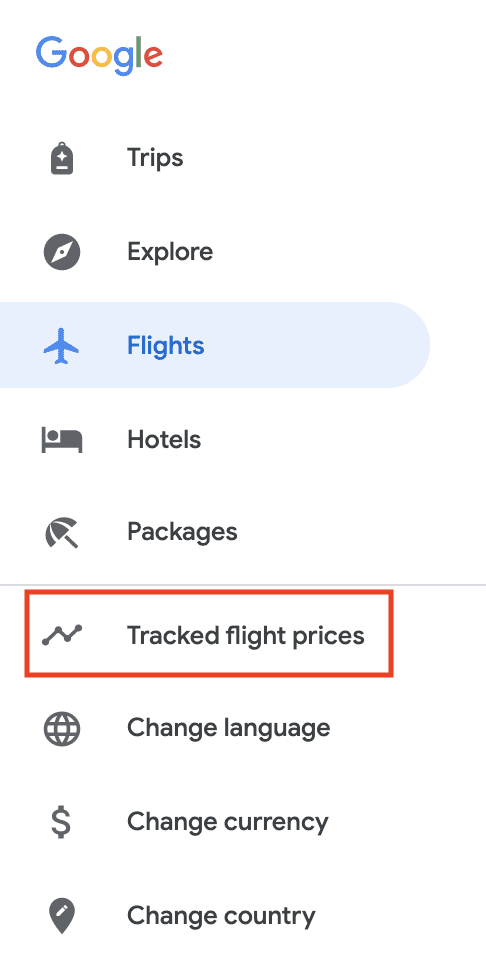
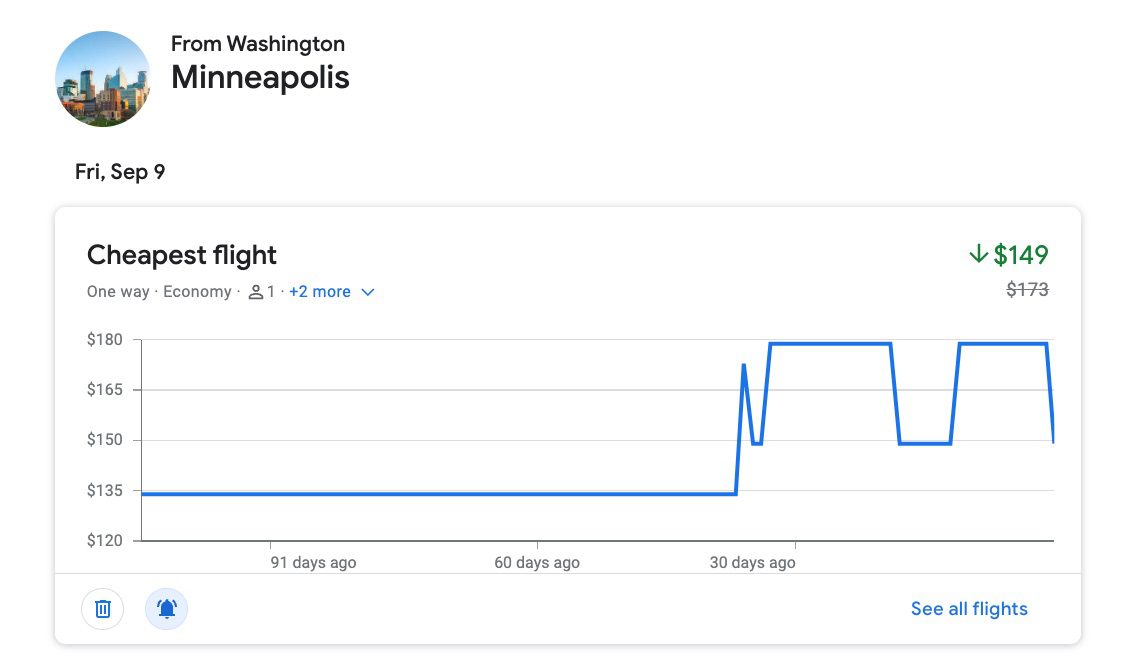
Beyond email notifications, users can manage their active portfolio of tracked itineraries directly within the Google Flights interface. By navigating to the sidebar menu and selecting "Tracked flight prices," travelers are presented with a centralized dashboard. This view lists all active alerts, complete with historical pricing charts that map out day-to-day fare changes since tracking began. If an itinerary is no longer relevant, users can easily remove it from their dashboard using the provided deletion tool.
Historical Data Analysis and Strategic Timing
One of the most valuable, yet frequently underutilized, components of Google Flights is its historical price visualization tool. When a user tracks a specific route, the platform generates a dynamic graph displaying pricing trends over time. This data empowers travelers to transition from passive observers to informed strategists.
By analyzing these charts, consumers can evaluate whether current airfare rates represent a historical low or an inflated peak. For example, historical data for domestic routes frequently demonstrates distinct booking windows. On routes such as Minneapolis to Nashville, data tracked over a span of more than 100 days may reveal an optimal booking window several weeks in advance, after which prices steadily climb. Conversely, routes between major hubs like Minneapolis and Boston sometimes exhibit stabilizing or even decreasing fares as departure dates approach, making patience a more profitable strategy. Evaluating these trends allows travelers to contextualize real-time price alerts and make data-driven purchasing decisions rather than relying on gut feelings.
Leveraging Post-Booking Price Drops for Travel Credits
A common misconception among consumers is that price tracking ceases to be useful once a ticket is purchased. In reality, modern industry practices have introduced new avenues for post-booking savings.
In the wake of financial pressures brought on by the global pandemic, major U.S. carriers instituted permanent structural shifts by eliminating standard change fees on most domestic and international main cabin fares. This policy transformation fundamentally altered consumer rights in the aviation sector. If the price of a booked flight drops significantly after purchase, travelers are no longer locked into their initial expenditure.
By maintaining active Google Flights price alerts for an already-booked itinerary, a traveler can instantly identify if a fare reduction has occurred. When a drop is verified, the passenger can contact the airline or navigate their online reservation portal to modify or cancel the existing ticket. The difference in fare value is typically returned to the consumer in the form of an electronic travel credit or voucher. These funds can then be applied toward future travel, effectively turning a missed discount into a future dividend.
Industry Implications and the Future of Airfare Forecasting
The proliferation of automated tracking tools reflects a broader shift in consumer behavior within the travel industry. As airlines increasingly rely on dynamic pricing algorithms—which adjust seat costs based on demand, booking velocity, fuel costs, and competitor pricing—the gap in information between airlines and passengers has widened.
Tools like Google Flights act as a counterweight, democratizing data access and restoring a degree of purchasing power to the consumer. Industry analysts note that while algorithms make airfare predictability difficult to master, the availability of historical trends and instant alerts encourages more methodical planning. Furthermore, as airlines continue to refine their ancillary revenue models—separating costs for baggage, seat selection, and boarding priority—the ability of platforms to filter alerts based on specific traveler needs becomes an indispensable asset.
Ultimately, while no digital tool can predict future geopolitical events, severe weather disruptions, or sudden fuel price spikes that invariably impact the aviation market, price alerts provide a reliable baseline of operational intelligence. By combining automated inbox notifications, historical trend analysis, and post-booking vigilance, travelers can navigate the complexities of modern airfare with significantly greater confidence and fiscal efficiency.